Overview
To connect your Kerio Operator to Deutsche Telekom (non-business), you need the following information:
- Your telephone numbers from Deutsche Telekom
- The SIP username and the SIP password
- The domain of Deutsche Telekom. For example,
tel.t-online.de.
Step-By-Step Guide
- In the administration interface of Kerio Operator, go to Configuration > Call Routing > Interfaces and routing of incoming calls.
- Click Add SIP Interface.
- Key in a name for the interface.
- In the With external number field, key in your numbers.
📌 If you have multiple numbers from Deutsche Telekom, write individual numbers separated by a comma (for example,
555 5501, 555 5502, 555 5503, 555 5504) or use a dash to define the range of numbers (for example,555 5501—555 5504). - Click Next.
- Select an extension that receives all calls from the provider by default.
- Optionally, In the Prefix to dial outfield, you can key in a prefix for outgoing calls.
- Click Next.
- In the Domain (IP address/hostname) field, key in
tel.t-online.de. - Key in the username and password.
- Select the Required to register option.
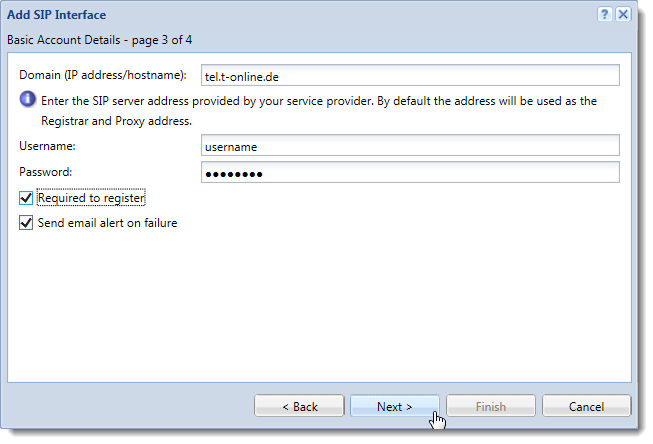
- Click Next.
- Select the Edit details of the created interface option and click Finish.
After you finish the configuration wizard, the Edit External Interface (SIP) dialog box opens:
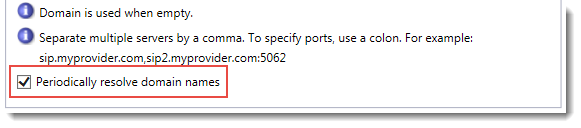
- In the Proxies and Registrar section, enable the Periodically resolve domain names option.
- Click OK.
Ciprian Nastase
Comments